
SaaS-Bench: Can Computer-Use Agents Leverage Real-World SaaS to Solve Professional Workflows?
2026-09-28
SaaS-Bench v1.1 Highlights
Can agents move from browsing pages to finishing professional work?
SaaS-Bench evaluates computer-use agents inside 23 real, deployable SaaS systems — where progress depends on persistent state, cross-application coordination, domain constraints, and verifiable final artifacts.
"Schau tief in die Natur, und dann wirst du alles besser verstehen."
— Albert Einstein
From Using Browsers to Doing Real Work
Computer-use agents are beginning to move beyond answering questions. They can now open browsers, navigate interfaces, fill forms, and click buttons. This shift from passive understanding to active execution is one of the most important directions in modern AI.
But it raises a harder question: if an agent can click through a website, does that mean it can complete real work?
In professional settings, a task is rarely a single-page interaction. A finance workflow may start in a CRM, continue in an accounting system, require validation against HR records, and end with a follow-up task. A healthcare workflow may require preserving clinical information across patient records, forms, and audit documents. The challenge is not whether an agent can find the right button — it's whether it can preserve intent, transfer information, maintain state, and finish a workflow whose result can be verified.
Existing benchmarks don't test this well. They typically use simplified websites, isolated single-app tasks, or short interaction sequences. Performance on these benchmarks can create an illusion of progress that disappears when agents face real software.
| Benchmark | Real SaaS | Professional Workflows | Multi-App | Long-Horizon (100+ steps) | Multimodal |
|---|---|---|---|---|---|
| Mind2Web | ✗ | ✗ | ✗ | ✗ | ✗ |
| WebArena | ✗ | △ | △ | ✗ | ✗ |
| VisualWebArena | ✗ | ✗ | △ | ✗ | ✓ |
| OSWorld | ✗ | △ | ✓ | ✗ | ✓ |
| WorkArena / WorkArena++ | ✓ | △ / ✓ | ✗ | ✗ | ✗ |
| TheAgentCompany | △ | ✓ | ✓ | ✗ | △ |
| SaaS-Bench | ✓ | ✓ | ✓ | ✓ | ✓ |
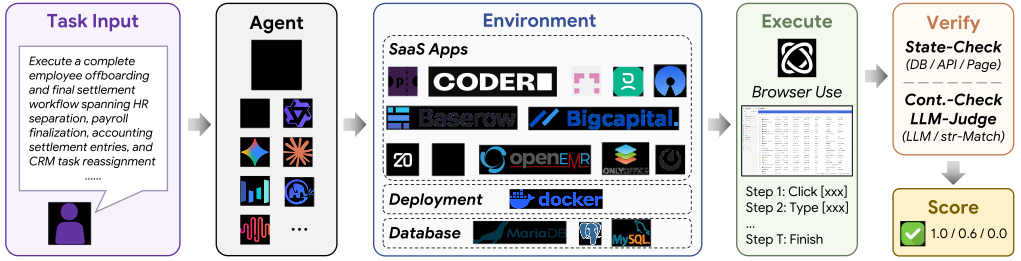
SaaS-Bench is built to fill these gaps. It evaluates computer-use agents inside real, deployable SaaS systems — not toy websites — with tasks that require cross-application coordination, professional domain knowledge, and sustained long-horizon execution.
Why SaaS?
Software-as-a-Service systems are where modern digital work happens. CRM platforms manage customer relationships. Accounting systems track invoices and payments. HR systems store employee records and reimbursements. Healthcare systems manage patient data and clinical documentation.
Compared with ordinary websites, SaaS applications are much closer to real deployment environments. They contain user authentication, database-backed state, business constraints, hidden dependencies, and structured workflows. A small mistake in one system can silently break a later step in another system. A missing record, a wrong entity type, or an inconsistent date can make the final task fail.
Dynamic State
Persistent records, hidden constraints, frontend-backend logic, and changing business state that agents must reason about.
Cross-App Workflows
Real tasks require transferring information across CRM, finance, HR, documents, email, and storage systems.
Long-Horizon Execution
Many workflows unfold across 100+ operations, stressing planning, memory, context propagation, and error recovery.
SaaS-Bench asks a direct question: Can agents operate SaaS systems as reliable professional workers, rather than just browser users?
Introducing SaaS-Bench
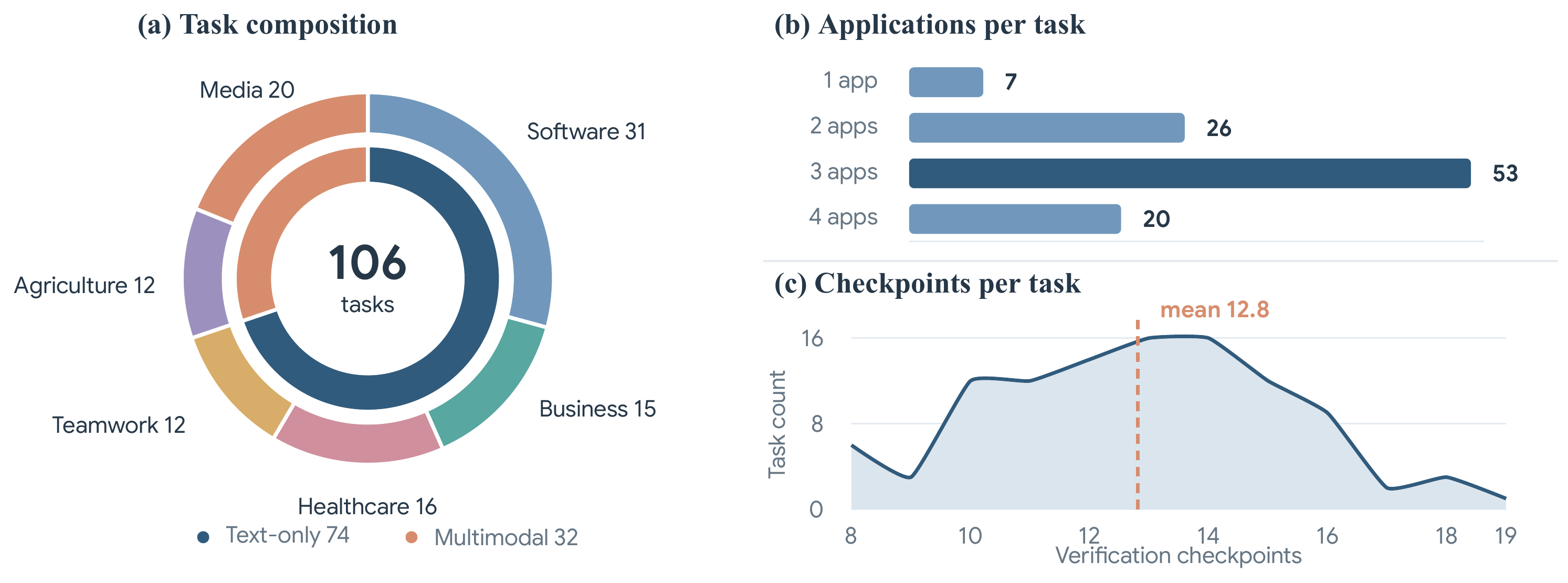
SaaS-Bench contains 23 real open-source SaaS systems, organized into 6 professional domains, with 106 tasks grounded in realistic work scenarios.
The six domains cover: Software Engineering & Project Management, Business Operations & Finance, Healthcare Administration, Team Collaboration & Document Workflow, Artisan Agri-Food Supply Chain, and Independent Media Creation. Each domain contains multiple functionally complementary applications that are naturally combined into cross-system workflows.
The benchmark is built around three principles:
Real and Deployable
SaaS-Bench uses actual SaaS systems with frontend-backend logic, authentication, persistent states, and realistic constraints — not toy websites or static pages. All systems are containerized with Docker. Before each task, the environment resets to a predefined initial state, ensuring reproducibility.
Professional Workflows
Tasks are not randomly sampled UI actions. They simulate real work: a finance closeout spanning HR, accounting, and CRM; a healthcare merge audit across patient records and documentation; a regression test execution tracked from IDE to project management.
Long-Horizon
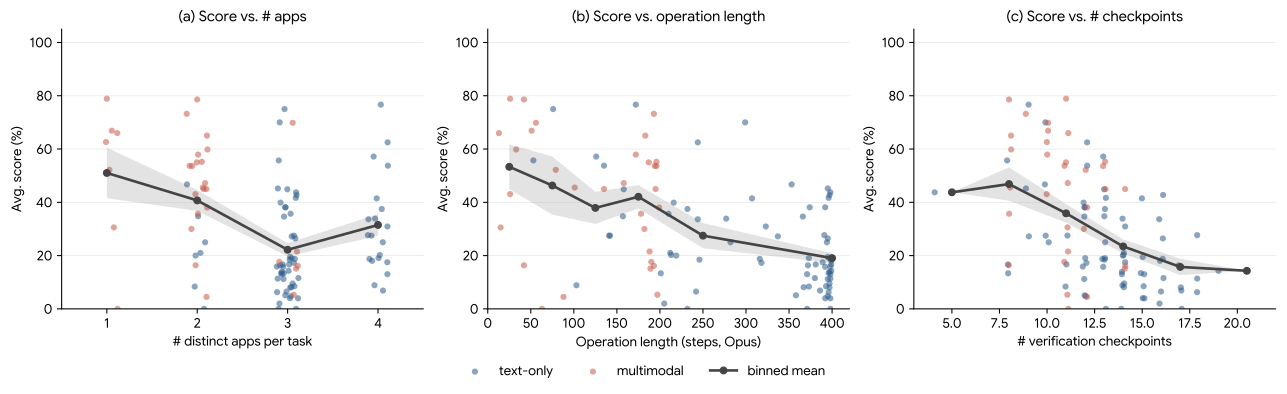
Each task has 12.8 verification checkpoints on average. Resolving a task requires satisfying every checkpoint, making state tracking, cross-application coordination, and error recovery essential throughout the workflow.
What Does a SaaS-Bench Task Look Like?
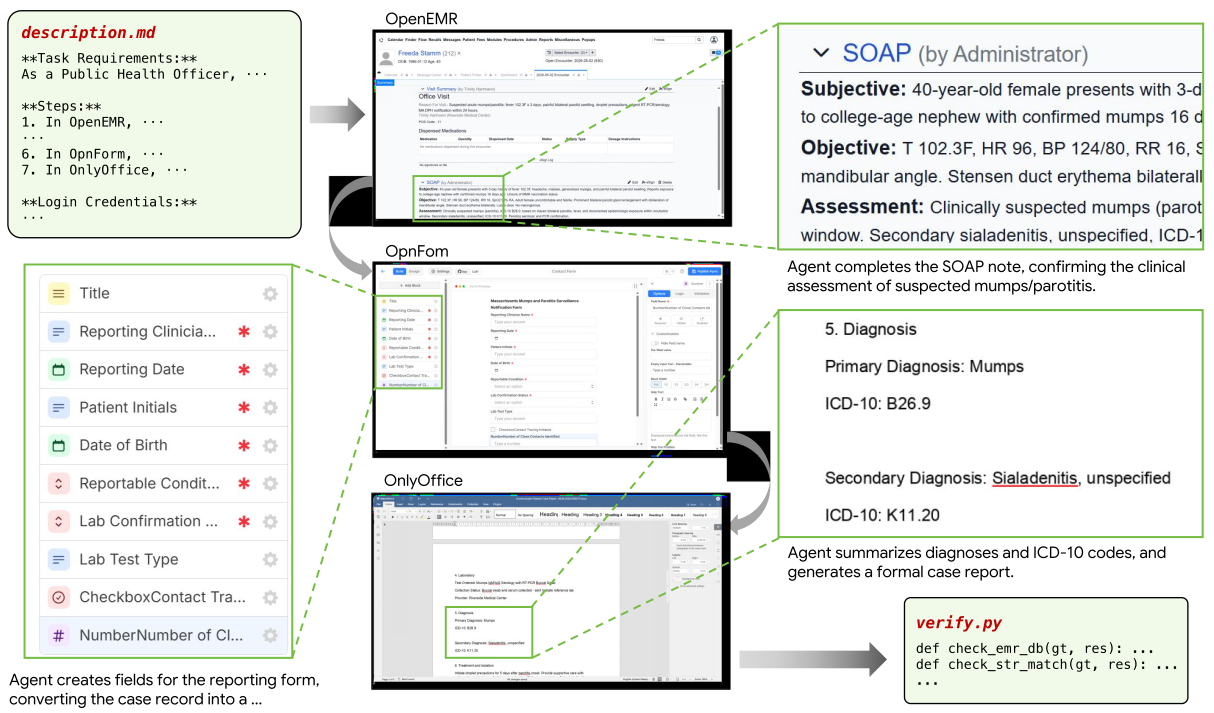
Each task is a professional workflow spanning multiple SaaS systems. Expand any case below to see the full task sheet — including requirements, step-by-step instructions, and login credentials.
Business Operations Employee Expense Reimbursement Cycle Frappe HRMSBigCapitalTwenty
Cross-app finance closeout spanning HR expense approval, accounting bill creation and payment, and CRM documentation.
Task Requirements:
Process a complete employee expense reimbursement cycle spanning HR expense claim approval, accounting expense recording and payment, and CRM documentation. In Frappe HRMS: (1) Navigate to the Expense Claim list and open the pending expense claim 'HR-EXP-2026-00006' submitted by employee 'Mohammed Farooq' (HR-EMP-00015). Verify it contains exactly three line items totaling ₹10,350.00. The line items are: 'Travel' for ₹8,500.00, 'Food' for ₹1,500.00, and 'Calls' for ₹350.00. (2) Approve the expense claim. (3) Navigate to the Unpaid Expense Claim report and verify that 'Mohammed Farooq' appears with an unpaid amount of ₹10,350.00 as an intermediate confirmation that approval succeeded. In BigCapital: (4) Create a vendor named 'Mohammed Farooq Reimbursement' with email 'mohammed.farooq@gmail.com'. (5) Ensure that three items exist in BigCapital corresponding to the expense types: 'Travel', 'Food', and 'Calls'. If any of these items do not already exist, create them as new items with the respective names. (6) Create a bill (purchase invoice) dated 2026-03-20 for vendor 'Mohammed Farooq Reimbursement' with three line entries referencing the items created/confirmed above: 'Travel' for ₹8,500.00, 'Food' for ₹1,500.00, and 'Calls' for ₹350.00. The bill total must equal ₹10,350.00. Approve (open) the bill. (7) Record a Payment Made dated 2026-04-05 against the bill for ₹10,350.00 from account 'Bank Account'. (8) Navigate to the A/P Aging Summary report filtered to as-of date 2026-04-05 and verify 'Mohammed Farooq Reimbursement' shows a zero balance (confirming the bill is fully paid). In Twenty CRM: (9) Create a task titled 'Expense reimbursement processed — Mohammed Farooq' with due date 2026-04-05 and body: 'Expense claim HR-EXP-2026-00006 approved and paid. Total: ₹10,350.00. Items: Travel (₹8,500.00), Food (₹1,500.00), Calls (₹350.00). Payment made from Bank Account on 2026-04-05.' Mark the task as complete.
Steps:
- In Frappe HRMS, open expense claim 'HR-EXP-2026-00006' for 'Mohammed Farooq' (HR-EMP-00015) and verify it has exactly three line items totaling ₹10,350.00: 'Travel' (₹8,500.00), 'Food' (₹1,500.00), 'Calls' (₹350.00).
- Approve the expense claim.
- Navigate to the Unpaid Expense Claim report and confirm 'Mohammed Farooq' appears with unpaid amount ₹10,350.00 as an intermediate validation that the claim was approved correctly.
- In BigCapital, create a vendor named 'Mohammed Farooq Reimbursement' with email 'mohammed.farooq@gmail.com'.
- Ensure three items exist in BigCapital with names 'Travel', 'Food', and 'Calls'. If any item does not already exist, create it as a new item with the corresponding name.
- Create a bill dated 2026-03-20 for vendor 'Mohammed Farooq Reimbursement' with three line entries referencing the items above: 'Travel' for ₹8,500.00, 'Food' for ₹1,500.00, 'Calls' for ₹350.00. The bill total must equal ₹10,350.00. Approve (open) the bill.
- Record a Payment Made of ₹10,350.00 against the bill from 'Bank Account' dated 2026-04-05.
- View the A/P Aging Summary as of 2026-04-05 and confirm 'Mohammed Farooq Reimbursement' has zero balance.
- In Twenty CRM, create a task titled 'Expense reimbursement processed — Mohammed Farooq' with the full reimbursement details in the body, set due date to 2026-04-05, and mark the task as complete.
Healthcare Duplicate Patient Merge Audit OpenEMROnlyOffice
Clinical data integrity workflow: identify duplicate patient records, execute a merge, verify combined clinical data, and produce a formal HIPAA-compliant audit report.
Task Requirements:
As a Health IT Manager, execute a duplicate patient record identification, merge documentation, and system audit workflow: (1) In OpenEMR, navigate to the Manage Duplicate Patients page and scan for potential duplicate patient records. Identify the duplicate pair: Latoyia Kertzmann (pid 158) and Latoyia Kertzmann (pid 249) based on matching demographics. Before merging, open both patient charts and document the following from each: active medical problems (from Issues), active medications (from Issues), and any allergy entries. Navigate to the Merge Patients page, select Latoyia Kertzmann (pid 249) as the source and Latoyia Kertzmann (pid 158) as the target, and execute the merge. After merging, open the merged patient record (Latoyia Kertzmann (pid 158)) and verify the combined Issues list contains all problems, medications, and allergies from both records. Navigate to System Logs and filter by today's date and event type containing 'merge' — record the log entry timestamp and user. Then navigate to the Address Book and add a new contact entry for the specialist 'Dr. Yusuf Abdelrahman' with specialty 'Gastroenterology', phone '339-555-0617', and address '1153 Centre Street, Suite 210, Jamaica Plain, MA 02130'. (2) In OnlyOffice, create a document titled 'Kertzmann Duplicate Patient Merge Audit Report - 2026-03-22' structured as a formal Patient Record Merge Audit Report: header with clinic name 'Metro West Regional Medical Clinic' and date; Merge Summary section with source record (Latoyia Kertzmann (pid 249)) and target record (Latoyia Kertzmann (pid 158)), merge date, and authorizing user 'Administrator'; Pre-Merge Data Comparison section with a table containing columns: Data Element, Source Record Value, Target Record Value, Post-Merge Value — populate rows for each medical problem, medication, and allergy from both records; System Log Verification section citing the audit log entry timestamp and confirming log integrity; Address Book Update section documenting the new specialist entry; and a Compliance Certification section with text 'I hereby certify that this duplicate patient record merge has been executed in full compliance with HIPAA data integrity requirements under 45 CFR §164.312(c), the ONC Health IT Certification Program record-keeping standards, and the clinic's Health Information Management policy HIM-022; all source-record clinical data has been preserved in the secure audit log for the mandated retention period and is available for regulatory inspection.' and signature block for 'Administrator'. (3) In OnlyOffice, create a second document (a spreadsheet) titled 'Duplicate Patient Record Merge Audit Tracker - March 2026' with columns: Merge ID, Source Patient, Target Patient, Merge Date, Data Elements Transferred, Verified By, Audit Log Confirmed (Yes/No), Notes. Populate one row for the completed merge. Add a second sheet 'Outside Specialist Contact Registry' with columns: Specialist Name, Specialty, Phone, Address, Date Added — populate with the specialist added in step 1.
Steps:
- In OpenEMR, navigate to Manage Duplicate Patients and scan for duplicates; identify the pair Latoyia Kertzmann (pid 158) and Latoyia Kertzmann (pid 249)
- Open both patient charts and document active medical problems, medications, and allergies from each patient's Issues list
- Navigate to Merge Patients, set Latoyia Kertzmann (pid 249) as source and Latoyia Kertzmann (pid 158) as target, and execute the merge
- Open the merged record for Latoyia Kertzmann (pid 158) and verify the combined Issues list contains all data from both records
- Navigate to System Logs, filter by today's date for merge events, and record the log entry timestamp and user
- Navigate to the Address Book and add specialist 'Dr. Yusuf Abdelrahman' with specialty, phone, and address
- In OnlyOffice, create a document titled 'Kertzmann Duplicate Patient Merge Audit Report - 2026-03-22' with merge summary, pre-merge data comparison table, system log verification, address book update, and compliance certification sections
- In OnlyOffice, create a spreadsheet titled 'Duplicate Patient Record Merge Audit Tracker - March 2026' with a merge tracking sheet and a contacts sheet, populated with the merge data and specialist entry
Software Eng. Regression Test Execution Audit code-serverBaserowOpenProject
Test evidence to project tracking: run tests in IDE, record structured results in a database, and create a project management work package.
Task Requirements:
Run a test execution audit for the data-analyzer and todo-api projects. In code-server, open the integrated terminal, navigate into each project directory, and execute the project's test command (pytest tests/test_analyzer.py -v for data-analyzer and make test for todo-api). Parse each run's output and record: tests passed, tests failed, and pass rate percentage (passed / (passed + failed) * 100, rounded to two decimals). Create a Baserow database "Regression Test Audit March 2026" with a table "Test Execution Audit" containing fields Project (primary text), Tests Passed (number), Tests Failed (number), Pass Rate (number with 2 decimals), Pass/Fail (single-select: Pass/Fail), Captured At (date). Add exactly two rows — one per project — using the measured counts; set Pass/Fail to Pass if the pass rate >= 85.00 else Fail. In OpenProject project "product-catalog", create a single work package of type Task with subject "Test Execution Audit Report" and a description containing the measured pass rates, passed/failed counts, and whether each project passed or failed against the threshold 85.00.
Steps:
- In code-server terminal, cd into data-analyzer and run pytest tests/test_analyzer.py -v, then parse the output to extract the number of tests passed and tests failed, and compute the pass rate percentage
- Repeat for todo-api using make test
- In Baserow, create "Regression Test Audit March 2026" with the "Test Execution Audit" schema (Project, Tests Passed, Tests Failed, Pass Rate, Pass/Fail, Captured At) and add exactly two rows populated with measured counts, computed pass rates, and Pass/Fail evaluated against 85.00
- In OpenProject "product-catalog", create a single Task work package with subject "Test Execution Audit Report" and a description listing, for each of the two projects, the measured pass rate, passed/failed counts, and whether it passed or failed against the threshold 85.00
Collaboration Cross-Team Status Distribution OnlyOfficeownCloudRoundcube
Document creation, cloud sharing with tiered access, and email distribution with read receipt tracking.
Task Requirements:
As a Cross-Department Project Coordinator, compile a cross-team status report and distribute it with tiered access: (1) In OnlyOffice, create a new document titled 'Cross-Team Bi-Weekly Status Report - W26-W27 2026' in Common Documents. Structure it with heading 'Cross-Team Bi-Weekly Status Report', a section 'Report Period' with text 'Bi-Weekly Period: June 22 – July 3, 2026', a section 'Engineering Updates' containing a table with 3 columns (Author, Update, Date), a section 'Marketing Updates' with the same table structure, a section 'Product Updates' with the same table structure, and a final section 'Cross-Team Risks' with text 'Primary risks include recurring incident postmortem findings not being actioned within SLA, delayed brand asset approvals impacting campaign timelines, and UX research insights arriving too late in the sprint cycle to influence design decisions.'. Share the document with user 'jun.chen' for viewing and user 'amit.singh' for editing. (2) In ownCloud, create a folder named 'Leadership_BiWeekly_Reports'. Inside it, create a subfolder named '2026-P13-P14'. Create a text file named 'exec_summary.txt' inside '2026-P13-P14' with content 'Executive Summary - Bi-Weekly Period June 22 – July 3, 2026: Engineering resolved 4 P1 incidents and delivered comprehensive postmortems; runbook updates are underway. Brand Design finalized the refreshed logo system and shipped updated style guides across all marketing channels. UX Research completed 3 rounds of user interviews, producing actionable insights that will shape the upcoming onboarding redesign. Coordination between teams remains strong; follow-ups needed on incident action-item tracking and brand asset handoff cadence.'. Add the tag 'biweekly-leadership' to 'Leadership_BiWeekly_Reports'. View the activity feed to confirm the sharing activity appears. (3) In Roundcube, navigate to Settings > Preferences > Composing Messages and set the auto-save draft interval to '5 minutes'. Then compose an email to ['jun.chen@onlyoffice.local', 'amit.singh@onlyoffice.local', 'laura.brown@onlyoffice.local'] with BCC to 'records@onlyoffice.local', subject 'Bi-Weekly Cross-Team Status Report - June 22 to July 3, 2026', and body summarizing the key findings from each department. Request a read receipt (MDN) on the email. Send the email. After sending, navigate to the Sent folder, open the sent email, and verify the subject line matches.
Steps:
- In OnlyOffice, create a structured status report document in Common Documents with per-department table structures, and share with specific users at different permission levels
- In ownCloud, create a hierarchical folder structure for reports, add an executive summary text file, tag the folder, and verify activity feed
- In Roundcube, configure composing preferences, then compose and send a leadership summary email with BCC and read receipt request, and verify the sent email in the Sent folder
Agriculture Batch Harvest Traceability Audit GrocyFarmOS
Inventory traceability: cross-reference batch numbers between warehouse management and field records, flagging discrepancies.
Task Requirements:
Iterate through all products in Grocy that have a batch number assigned in their 'batch_number' custom userfield. For each batch number, query FarmOS to see if a corresponding harvest log exists where the harvest log's name is the exact batch number. If a Grocy product's batch number has no match in FarmOS, edit the Grocy product to append 'AUDIT FLAG: Missing FarmOS harvest log' to its description field.
Steps:
- Retrieve all batch numbers from Grocy products' custom userfields.
- Cross-reference each batch number against FarmOS harvest log names.
- For any unmatched batch, append the discrepancy flag to the Grocy product description.
Media Research Note from an Academic PDF PDF inputSiYuan
Knowledge synthesis: read an academic PDF and create a structured research note with abstract summary, core arguments, and integration ideas.
Task Requirements:
Read the provided PDF paper on Collaborative Knowledge Creation. In SiYuan, create a new document named 'Research: Collaborative IR' in the 'Academic Sources' notebook. Structure the document with three sections: 'Abstract Summary' (a detailed summary in your own words), 'Core Arguments' (a bulleted list of at least 3 main points from the paper), and 'Podcast Integration Ideas' (2 specific ways this connects to our media consumption habits). Ensure the document uses proper Markdown heading levels (H2) for the sections.
Steps:
- Analyze the provided academic PDF to extract its abstract and core arguments.
- Create the required notebook and document in SiYuan.
- Draft the structured summary, arguments, and integration ideas using H2 headings.
Input files:
tasks/multi-m/inputs/siyuan_paper_001.pdf — Collaborative Knowledge Creation and Management in Information Retrieval (application/pdf)
How Tasks Are Built
SaaS-Bench tasks are not produced by simply asking an LLM to invent browser tasks.
The construction follows a four-stage pipeline. Starting from professional domains and occupational roles (project managers, finance operators, healthcare administrators), workflow seeds define task goals, domain context, required applications, and verification requirements. An LLM Builder then proposes task templates and concrete instances, but every candidate passes through a Builder-Challenger-Refiner loop: human expert Challengers inspect for ambiguity, executability, and professional realism; human Refiners decide whether to accept, revise, or reject.
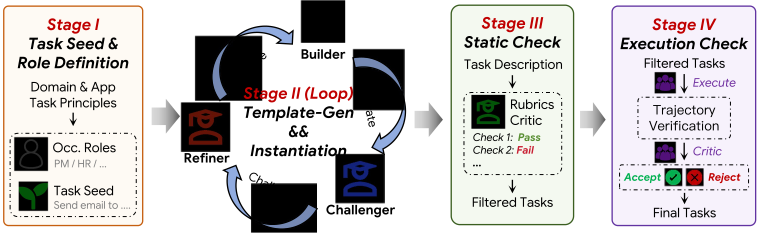
After the synthesis loop, two more quality gates apply. A static check evaluates professionalism, cross-app naturalness, dependency depth, verifiability, and narrative coherence — and flags anti-patterns like using a CRM as a mere dumping ground or creating complexity through over-specification. An execution check has experts run the task, inspect the trajectory, and verify alignment between the instructions and the verifier.
Only 45% of candidate tasks survive the full process. This turns SaaS-Bench from a collection of plausible prompts into a benchmark of executable, verifiable professional workflows.
Evaluation Protocol
SaaS-Bench tasks are designed around how people perform real professional work in SaaS systems. Each task specifies a practical objective and the records or artifacts needed for completion. The evaluation checks whether the resulting application state satisfies those requirements.
SaaS-Bench reports two metrics:
Weighted fraction of passed checkpoints. Measures partial progress — how far the agent got before failing.
1 only when all checkpoints pass; 0 otherwise. The strict measure: did the agent finish the job?
This distinction matters. In long professional workflows, an agent may complete early steps correctly but fail when context must be preserved, transferred, or propagated across systems. Checkpoint Score shows partial capability; Resolved Score shows whether the agent truly completed the job.
Results: SaaS-Bench v1.1
CS = Checkpoint Score, measuring partial progress across verification checkpoints. RS = Resolved Score, the percentage of tasks completed end to end. The same model can have different results under different harnesses, so each model–harness pair is shown separately.
| Model | Harness | Step / task | Cost / task | Tool Call / task | CS (%) | RS (%) |
|---|---|---|---|---|---|---|
| Generic Harness | ||||||
| GPT-5.6 sol | Browser-Use (Open-Source) | 142.7 | ~$14.9 | 257.7 | 69.8 | 17.9 |
| Opus 5 | Browser-Use (Open-Source) | 162.1 | ~$20.0 | 239.4 | 64.7 | 21.7 |
| Qwen 3.8 max | Browser-Use (Open-Source) | 71.5 | ~$2.5 | 131.3 | 31.1 | 8.5 |
| Kimi K3 | Browser-Use (Open-Source) | 121.9 | ~$6.8 | 237.8 | 56.2 | 17.0 |
| Native Harness | ||||||
| GPT-5.6 sol | Codex | 250.7 | ~$20.5 | 250.7 | 71.1 | 29.2 |
| Opus 5 | Claude Code | 270.5 | ~$26.5 | 270.5 | 74.3 | 31.1 |
| Qwen 3.8 max | Qwen Code | 268.9 | ~$5.1 | 268.9 | 65.9 | 23.6 |
| Kimi K3 | Kimi-CLI | 284.4 | ~$9.4 | 284.4 | 56.4 | 24.5 |
| Pine Computer | Pine Computer Runtime (PCR) | 335.5 | ~$3.6 | 306.2 | 78.3 | 27.4 |
Values are from the v1.1 results table. Cost per task is approximate, in USD. CS and RS are percentages. On narrow screens, scroll the table horizontally to view every column.
Where Agents Fail: Four Structural Challenges
The aggregate numbers tell us agents struggle. The case studies tell us why.
By analyzing individual verification outcomes and execution trajectories, we identify four failure modes that explain the low resolved scores. These are not random errors — they are structural properties of real-world SaaS workflows that current CUA designs are ill-equipped to handle.
1. The Fragility of Long-Horizon Completion
The most striking pattern is the gap between checkpoint scores (30–43%) and resolved scores (<4%). If each checkpoint has an independent pass probability p, the probability of all N checkpoints passing is pN. Even with p = 0.95 across 12 checkpoints, the resolved probability is only 0.9512 ≈ 0.54. For the typical SaaS-Bench task with 10–20 checkpoints and empirical per-checkpoint pass rates well below 0.95, near-zero resolved scores are a mathematical inevitability.
Near-Miss with Undetected Date Error
Opus 4.6 scored 0.80 (16/20 checkpoint weight) on a Business Operations reimbursement task spanning HRMS, BigCapital, and Twenty CRM. It correctly approved the expense claim, created the vendor, recorded all line items, completed the payment, and created the CRM task.
But the bill was created with date 2026-03-19 instead of the required 2026-03-20. This single uncorrected date is sufficient to prevent task resolution despite an 80% checkpoint score.
✗ Bill date = 2026-03-19 (expected 2026-03-20) — task NOT resolved
The implication: incremental improvements in per-checkpoint reliability yield superlinear gains in end-to-end completion. Current agent training paradigms, which typically optimize step-level rewards, are not designed to exploit this property.
All models show a monotonic decline from early to late checkpoints, confirming the long-horizon bottleneck:
2. Error Cascading Across Applications
SaaS-Bench workflows have DAG dependencies: intermediate outputs serve as inputs to downstream operations. A single semantic error early in the chain can propagate silently and cause multiple downstream checkpoints to fail.
Entity-Type Mismatch Cascades Through Financial Records
This task spans Twenty CRM, BigCapital, and Pretix (18 checkpoints, weight 33). All BigCapital financial records must be anchored to a company customer named Arcturus Digital.
Opus 4.6 reached BigCapital's New Customer form and filled in both personal name fields (First: Elena, Last: Vasquez) and a company name (Arcturus Digital). This created an individual customer named Elena Vasquez — not a company customer named Arcturus Digital. The agent didn't notice: the display label showed "Elena Vasquez (Arcturus Digital)" with the expected $55,000 balance, and the agent read this as confirmation of correct completion.
✗ Checks 10–12: Invoices and payment — not found (depends on Check 7, weight 6)
✗ Check 14: Customer balance = $0 (expected $55,000, depends on Check 7, weight 3)
✗ Checks 15–18: All Pretix checks — event not created (weight 6)
True cost of one entity-type error: 10 out of 33 points (30%), though the chokepoint check itself accounts for only 3%.
Seven of nine models failed to create Arcturus Digital as a company customer. The three that succeeded still failed on downstream financial checks. No model achieved a resolved score on this task.
The error is invisible during execution because the UI surface shows a plausible-looking result. Handling such cases requires agents to maintain an explicit model of how application data schemas map task-level concepts ("client", "customer") to application-specific entity types — a capability current agents do not possess.
3. Agents Don't Know When They've Failed
Current CUA frameworks give agents an internal reasoning trace — evaluation, memory, and next-goal fields — that lets them assess their own progress. But are these self-assessments reliable?
Claimed Success Despite Verification Failure
Returning to the expense task: at step 124, Opus 4.6 correctly identified the bill date was wrong (2026-03-19 instead of 2026-03-20) and planned a correction. But 41 steps later, its internal evaluation shifted to "Success" — the agent assumed the fix worked without re-checking the field.
At task termination (step 210), the agent declared the bill was "dated 2026-03-20" — the intended date, not the actual date. The summary drew from planned intentions rather than observed results.
This reveals two layers of failure:
- Absent re-verification. The agent recognized an error, attempted a fix, then assumed success without closing the verification loop. Humans naturally re-verify after corrective actions — refreshing a page, re-reading a field. The agent did not.
- Overconfident summarization. The final output claimed a state that was flagged as incorrect 86 steps earlier. The termination summary is more aspiration than observation.
Implication: A more robust architecture needs explicit outcome verification steps — re-reading a field after submission, querying a record after creation — before marking a subtask as complete.
4. A Single Run Is Not Enough
Agent evaluation commonly reports single-run (pass@1) performance. Our results show this can be highly misleading.
0.00 to 0.68 Across Three Runs of the Same Model
Claude Sonnet 4.6 was evaluated three times on the same task with the same initial state:
- Run 2: Score 0.000 — complete failure to engage
- Run 0: Score 0.214 — progressed through ERPNext but stalled
- Run 1: Score 0.679 — completed ERPNext, both expenses, and all three CRM follow-up tasks
The range from total failure to substantial completion cannot be attributed to environmental stochasticity — the SaaS environment is identical across runs. The root cause is path dependence: at critical decision points, small differences in sampling lead to fundamentally different trajectories. Once an agent commits to a suboptimal path (e.g., spending 50 steps struggling with an unfamiliar UI element), the remaining step budget may be insufficient to recover.
For evaluation: reporting only pass@1 can misrepresent agent capability. Multi-run metrics provide a substantially more informative assessment.
For deployment: production CUA systems would benefit from retry mechanisms, ensemble strategies, or checkpoint-based recovery that mitigate unfavorable early-trajectory decisions.
@misc{shi2026saasbenchcomputeruseagentsleverage,
  title = {SaaS-Bench: Can Computer-Use Agents Leverage Real-World SaaS to Solve Professional Workflows?},
  author = {Kean Shi and Zihang Li and Tianyi Ma and Zengji Tu and Jialong Wu and Xinbo Xu and Qingyao Yang and Ruoyu Wu and Weichu Xie and Ming Wu and Jason Zeng and Michael Heinrich and Elvis Zhang and Liang Chen and Kuan Li and Baobao Chang},
  year = {2026},
  eprint = {2605.15777},
  archivePrefix = {arXiv},
  primaryClass = {cs.AI},
  url = {https://arxiv.org/abs/2605.15777},
}